Tattoo Waitlist Workflow: How to Manage High-Demand Booking
When you're booked 3 months out, every inquiry is a potential client you might lose. A waitlist workflow turns demand into bookings systematically.

What a Tattoo Waitlist Workflow Actually Is
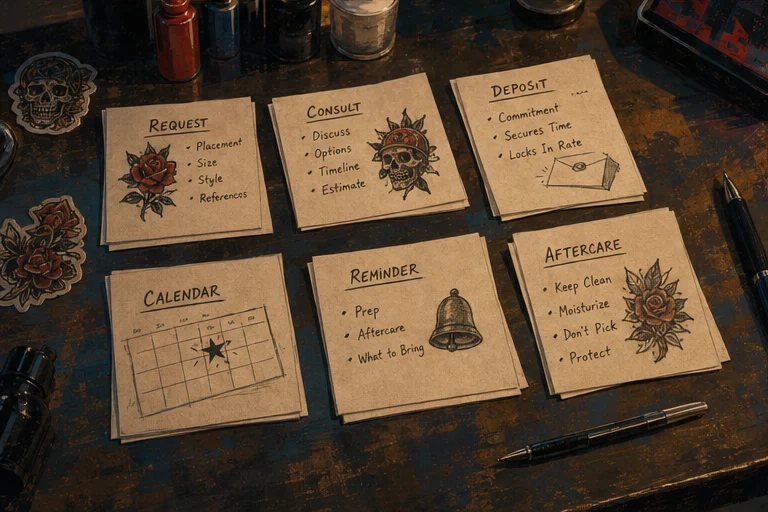
A tattoo waitlist workflow is the system that turns "I'm booked out" into "you're next" without you scrambling every time a chair opens up. Most artists don't have a workflow — they have a list of names and a group text they fire off in a panic when someone cancels. This guide walks the whole thing: when to open a waitlist, how to capture it, how to notify the right person first, and how to convert a name on a list into a paid deposit.
The Full-Calendar Problem

You closed your books. You have a waitlist. Now what?
Most artists put names on a list and forget about them until someone cancels. Then they scramble to find someone available, send a group text, and either get lucky or end up with an empty chair for a few days.
That's not a waitlist system—that's a hope system.
A real waitlist workflow does three things:
- Keeps potential clients warm until you're ready
- Gives you a direct line to qualified leads when a slot opens
- Makes the whole thing feel professional instead of chaotic
When You Actually Need a Waitlist

Not every artist needs one. A waitlist makes sense when:
- You have more booking requests than you can handle
- You're booked out 2+ months in advance
- You work in a specialty or style with limited competition
- You want to be selective about who you book without saying no flat-out
If you're consistently booking same-week appointments, a waitlist is overhead you don't need yet.
The Manual Waitlist Workflow
If you're not using software for this, here's how to do it without losing your mind.
Step 1: Capture the right information
Don't just take a name. Your waitlist intake should include:
- What they want (style, size, placement)
- Ideal timing (any upcoming dates they have in mind?)
- Budget range (rough—is this a $200 piece or $2,000?)
- Deposit willingness (will they put money down to hold a slot?)
- Contact info (phone and email—phone is faster)
You can capture this in a Google Form, a Typeform, or just a text conversation. The point is: write it down, and get enough detail that you can qualify them quickly when a slot opens.
Step 2: Give them a timeline expectation
Tell people upfront: "I'm currently booked 3 months out. I'll reach out when I have an opening." Don't let them think they're next in line if they're really fifth on a list.
Step 3: Notify in order—but qualify fast
When a slot opens, go down your list. But don't just offer it to the first person who responds. Send one message:
"Hey, I have a [date] opening. Still interested? I can hold it for 24 hours with a deposit."
This does two things: confirms they're still available and qualified, and creates urgency without being pushy.
Step 4: Move to the next person if no response
Give them 24–48 hours. If they don't respond or pass, move to the next name. Don't hold a slot open for more than 48 hours for a waitlist client—that's time you could be offering to someone who actually wants it.
The Problem With Manual Waitlists
The manual approach works until it doesn't. The break point is usually around 20–30 waitlist names. After that:
- You can't remember who's where on the list
- You forget to check it when a slot opens
- Messages get lost in DMs
- Some people have outdated contact info
- You spend real time managing the list instead of tattooing
If you're spending more than 10 minutes a week on your waitlist, you need a better system.
Automating Your Tattoo Waitlist Workflow
The better approach: use a booking system that captures and notifies your waitlist automatically.
When a client joins your waitlist through LVL2, they:
- Submit their booking request with all the intake details
- Get added to your waitlist queue automatically
- Receive a message when their position changes or when a slot opens
- Can confirm and deposit without a back-and-forth text
When you have a cancellation, you open your LVL2 dashboard, check your waitlist, and send an offer to the next qualified client. They book the open slot themselves, pay the deposit, and you're done. No group texts, no scramble.
The system also tracks who's been offered a slot and passed, who's confirmed, and who's still waiting. You can see at a glance how your waitlist is converting.
Converting Waitlist Clients to Bookings
A waitlist that never converts is just a contacts list. Here's how to move people through it:
Offer slots as soon as they open. Don't let holes sit. A waitlist client who gets an offer within a day of a cancellation feels prioritized. One who waits three weeks while you "check around" feels forgotten.
Give them something to commit to. A deposit to hold the slot isn't just about protecting yourself—it's about filtering for real commitment. The clients who pay are the clients who show up.
Let them know what they're getting. Before you send an offer, have the details ready: date, time, what you're planning, approximate session length. Vague offers get ignored or declined.
Follow up once. If they pass on the first slot, send one follow-up: "I may have another opening in [timeframe]. Still want to be considered?" Some clients are genuinely busy and just need a little flexibility.
Don't keep them waiting forever. If someone has been on your waitlist for 6 months and you've offered them two slots and they've passed both, it's okay to let them know you're moving them to the bottom of the list or removing them. A stale waitlist does no one good.
What to Do With a Waitlist That's Too Long
If you have 100 people on your waitlist and you're booking 2 months out, your waitlist is a marketing asset, not just a backup system. Here's what to do with it:
Segment it. Some people want small pieces, some want large work. Some have flexible schedules, some only have weekends. When a slot opens, you go to the right segment first.
Use it for flash days. A flash day is a great way to work through a waitlist. Send a message to your waitlist: "I have a flash day coming up—here's how to claim a spot." The clients who respond are qualified and motivated.
Announce it to your community. A big waitlist means people are interested in booking you. Post about it. "I'm currently booked 3 months out but taking names for my waitlist. Link in bio." That's not noise—that's demand signal.
The One Rule
A waitlist only works if you actually contact the people on it. The best system in the world fails if you check it once a month and only when you're desperate.
Set a calendar reminder: every time you have a cancellation, check the waitlist. Every month, send a quick update to the whole list—"Still taking appointments, here's my current wait time." Some people will drop off. Some will book. Either way, you're not leaving money on the table.
Tattoo Waitlist Workflow FAQ
When should I open a tattoo waitlist? When you're consistently booking past your comfortable lead time — usually 3-4 weeks out. Before that, a waitlist just adds friction.
How do I fill a last-minute cancellation from a waitlist? Notify in order, give a real deadline (24-48 hours), and take a deposit to lock the slot. First to pay keeps it. A group blast to everyone at once creates a race and burns goodwill.
Should a waitlist spot require a deposit? For the actual booking, yes. For sitting on the list, no — charging to wait kills the list. Take the deposit when you convert them to a real appointment.
Manage your waitlist professionally
LVL2's booking system supports waitlist management — when a slot opens, notify waitlist clients and convert the opening into a booking automatically.
Try LVL2 Free