
Jess T.
Request from your booking pageUnread

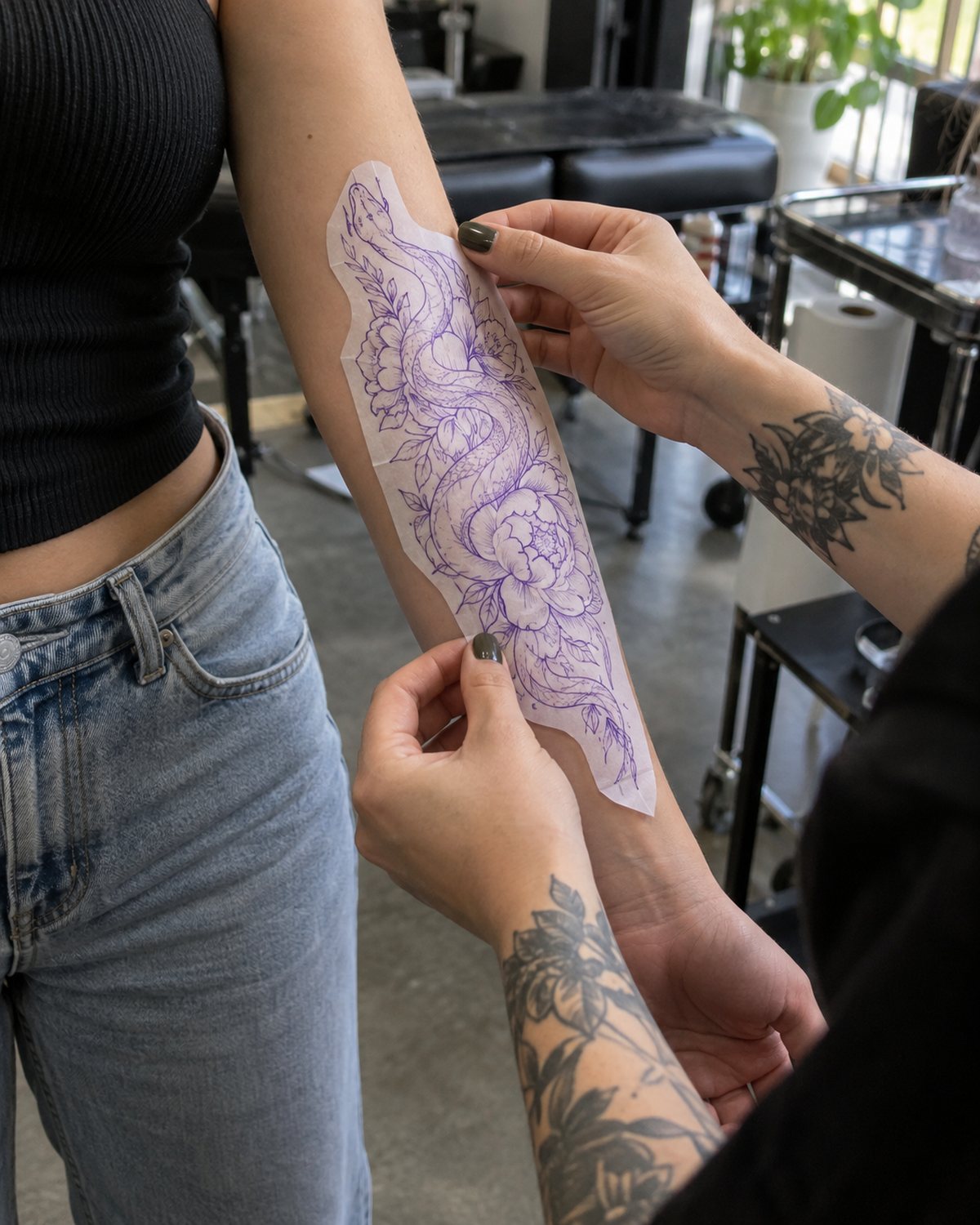
 Jess T.'s referenceRight forearm, outer
- Placement
- Forearm
- Side
- Right, outer
- Size
- Palm · 3 to 4 in
Deposit$20 dueRequested after you approve
Compare Booksy's marketplace and calendar scheduling with 
 's tattoo-specific request intake, artist approval, deposit collection, digital waivers, and studio operations. Evaluate both platforms against the same real booking scenario.
Booksy public pricing & documentation + repo-verified features
Jess T.
Request from your booking pageJess T.'s referenceRight forearm, outerTo compare with Booksy, test the same tattoo booking journey in both products: submit references, approve the request, collect a deposit, confirm the appointment, complete a waiver and handle a reschedule. Compare the total cost and who pays each fee. If flash drops or print-on-demand merch matter to your business, include those workflows in the test rather than judging the products on calendar scheduling alone.
ReviewedReviewed September 28, 2026 · US Booksy terms checked at biz.booksy.com/pricing · repo-verified
base tierCREW.INK takes itReviewed September 28, 2026 · US Booksy pricing checked at biz.booksy.com/pricing · repo-verified · Features marked '—' are not stated on competitor primary pages.
Rather than judging software on marketing claims or feature counts alone, test the 6 essential tattoo studio workflows in a trial workspace before migrating your business.
: Jess's depositJess pays the fee. You get the full $20.
 Appointment reminder
 Maya Rivera is in 2 days. Reply here if anything changes.Jess T. · 9:00
Submit a real project request with placement, dimensions, budget, and multiple reference images. Check whether references stay permanently attached to the client record.
Review the inquiry before locking a date. Verify whether the artist can message the client, clarify details, and accept or decline before payment is requested.
Collect a required booking deposit to confirm the reservation. Confirm payout timing, payment processing rates, and whether the client or artist absorbs fees.
Check appointment synchronization with  Google or Apple Calendar and verify automated 48-hour and 2-hour
 SMS/email reminders to prevent no-shows.
Send a digital liability waiver before the session. Confirm that the client's signature and government photo ID securely attach to the specific appointment history.
Move the appointment date or process a cancellation. Verify whether the existing deposit rolls over automatically according to your shop's deposit policy.
If your studio releases flash or sells apparel, test launching a limited-design drop with countdown timers and instant reservations, or setting up print-on-demand fulfillment.
Add base subscriptions, per-staff fees, booking fees, processing rates, and any marketplace commission (e.g. 30% Boost on Booksy) for your actual studio volume.
Custom tattoo projects require reviewing artwork ideas, placement, and sizing before a date is committed. keeps project review separate from calendar confirmation so artists can clarify details, estimate hours, and approve projects before accepting deposits. Booksy focuses on direct appointment scheduling where clients pick a service time slot.
Booksy charges a $29.99/month base subscription in the US plus $20/month per additional team member, and its optional Boost marketplace charges 30% on the first visit of a newly acquired client. Booksy does not charge clients a booking fee. offers a $0/month Free tier where one booking fee (9.9%) on deposits and card payments can be paid by the client, absorbed by the artist, or split; Plus is $39/mo (4.5% booking fee) and Pro is $99/mo (3.5% booking fee).
Booksy operates a high-traffic consumer marketplace where clients search for barbers, salons, and beauty services. If marketplace walk-ins drive your revenue, Booksy provides an established discovery channel. does not run a consumer marketplace; it is built for artists who market via  Instagram,
 TikTok, website links, or studio referrals and want complete control over their client relationships without paying marketplace commissions.
integrates tattoo-specific operational tools: numbered flash drops with countdown timers, digital liability waivers with photo ID capture attached directly to the appointment, and a built-in print-on-demand merch store. Booksy includes general digital forms and retail product inventory tracking, but does not offer tattoo flash drops or built-in print-on-demand fulfillment.
You rely heavily on local consumers searching a booking app for new barbers, stylists, or estheticians.
You run a mixed-service shop where appointments have fixed durations and do not require custom art review.
Your clients book standard catalog services directly onto open calendar slots without back-and-forth consultation.
You prefer paying a fixed monthly rate ($29.99/mo + $20/staff in US) and passing zero booking fees to clients.
You need clients to submit placement, size, and reference photos, with artist approval required before confirming dates.
You release flash designs with countdown timers, numbered claim slots, and instant reservation deposits.
You require digital tattoo consent forms with photo ID capture attached directly to client records.
You bring your own clients from Instagram, TikTok, website, or referrals, and want to avoid 30% new-client commissions.
You want a $0/mo base plan where the booking fee can be paid by the client, or a $99/mo Pro plan with a 3.5% booking fee.
Booksy has built a substantial consumer marketplace and booking app. If you're a barber or salon stylist who benefits from clients discovering your shop through local directory search, Booksy delivers real discovery value. Its calendar management, automated SMS/email reminders, and multi-staff scheduling are proven, reliable salon tools.
If walk-ins and local marketplace browsing drive your bookings rather than your personal portfolio and direct social channels, Booksy's marketplace reach is a genuine business asset that direct booking pages cannot match.
 Booksy takes the marketplace row
…you run a mixed shop where hair, nails, or spa services dominate. is built specifically for tattoo-only and tattoo-dominant shops. If tattooing is a secondary offering, a general salon platform like Booksy is better suited as your central front desk, while some mixed studios use solely for their tattoo artists' deposits, intake, waivers, and flash.
…marketplace discovery is your primary source of new clients. Booksy's consumer marketplace connects users searching for local service providers. is designed for tattoo artists converting their existing audience from Instagram, TikTok, personal websites, and client referrals without giving up a percentage of new-client revenue.
Switching studio software requires managing client records, future bookings, and compliance documents safely.
Booksy allows exporting client names, phone numbers, and email addresses to CSV from account settings. Export this data before closing or transitioning your account.
Neither platform offers automated cross-platform appointment migration. Maintain your Booksy calendar until existing bookings conclude, or manually enter future appointments into .
Health regulations in most jurisdictions require retaining signed liability waivers for multiple years. Download and store historical Booksy waivers locally; initiate fresh digital waivers for new bookings.
If Booksy's marketplace brings genuine new client volume, you can keep a basic Booksy profile active for discovery while directing social media and repeat clients to your direct link.
All features included at every tier. No per-user or seat charges. Card processing is covered by the booking fee — no separate processing charge.
A 5-artist shop is $109.99/mo base subscription before payment processing or optional Boost promotion.
Every competitor pricing, feature, and fee assertion is cited directly from official provider documentation checked September 28, 2026. Terms may vary by country, region, and date.
Pricing & PlansGlobal (USD base)Independent artists & studios — Verified Free ($0/mo), Plus ($39/mo), and Pro ($99/mo) plans, booking fee payer options, and 30% print-on-demand merch profit share. or Booksy better for tattoo artists?It depends on your studio workflow. is designed specifically for tattoo requests, artist approval, deposit collection, digital waivers, and flash drops; Booksy is built for general appointment scheduling and consumer marketplace discovery. Compare both workflows against your shop's booking process before deciding.
Booksy's base subscription ($29.99/mo in the US) has no commissions on standard bookings. However, if you enable Booksy Boost for marketplace discovery, Booksy charges a 30% commission on the first visit of each new client acquired through the marketplace. charges no client-acquisition commissions.
have an Assistant on SMS?The Assistant turns inbound texts into structured requests and drafts the reply for you. Nothing is sent on your behalf until you review, edit, and approve it. Check the current account and permission details before relying on any automated messaging.
and Booksy?Both platforms support deposit collection via integrated payment processors. requires deposits upon artist approval before confirming appointments and allows the booking fee to be assigned to the client, artist, or split. Booksy supports prepayment and cancellation deposit protection, with standard merchant processing rates.
together?Yes. Some artists maintain a basic Booksy profile to capture local search discovery from Booksy's consumer marketplace, while routing repeat clients, website visitors, and social media followers to their page for tattoo-specific request review, flash drops, and digital waivers.
? was built by a working tattoo artist who still tattoos every day. Every feature—from custom request intake to numbered flash drops and linked digital waivers—was created to solve actual daily problems in a working tattoo shop.
Looking for the best Booksy alternative for tattoo artists? Read the in-depth blog comparison →
$0/mo on Free, with a 9.9% booking fee on deposits and card payments (client-paid by default). No per-user seat charges. Tattoo-native workflows including request approval, flash drops, digital waivers, print-on-demand merch, and the Assistant on SMS that drafts replies you approve. Built by a working tattoo artist.
Compare Booksy's marketplace and calendar scheduling with 's tattoo-specific request intake, artist approval, deposit collection, digital waivers, and studio operations. Evaluate both platforms against the same real booking scenario.
Jess T.
Request from your booking pageJess T.'s referenceRight forearm, outerBooksy public pricing & documentation + repo-verified features
To compare with Booksy, test the same tattoo booking journey in both products: submit references, approve the request, collect a deposit, confirm the appointment, complete a waiver and handle a reschedule. Compare the total cost and who pays each fee. If flash drops or print-on-demand merch matter to your business, include those workflows in the test rather than judging the products on calendar scheduling alone.
ReviewedReviewed September 28, 2026 · US Booksy terms checked at biz.booksy.com/pricing · repo-verified
base tierCREW.INK takes itReviewed September 28, 2026 · US Booksy pricing checked at biz.booksy.com/pricing · repo-verified · Features marked '—' are not stated on competitor primary pages.
Rather than judging software on marketing claims or feature counts alone, test the 6 essential tattoo studio workflows in a trial workspace before migrating your business.
Submit a real project request with placement, dimensions, budget, and multiple reference images. Check whether references stay permanently attached to the client record.
Review the inquiry before locking a date. Verify whether the artist can message the client, clarify details, and accept or decline before payment is requested.
Collect a required booking deposit to confirm the reservation. Confirm payout timing, payment processing rates, and whether the client or artist absorbs fees.
Check appointment synchronization with Google or Apple Calendar and verify automated 48-hour and 2-hour SMS/email reminders to prevent no-shows.
Send a digital liability waiver before the session. Confirm that the client's signature and government photo ID securely attach to the specific appointment history.
Move the appointment date or process a cancellation. Verify whether the existing deposit rolls over automatically according to your shop's deposit policy.
If your studio releases flash or sells apparel, test launching a limited-design drop with countdown timers and instant reservations, or setting up print-on-demand fulfillment.
Add base subscriptions, per-staff fees, booking fees, processing rates, and any marketplace commission (e.g. 30% Boost on Booksy) for your actual studio volume.
: Jess's depositJess pays the fee. You get the full $20.
Appointment reminderMaya Rivera is in 2 days. Reply here if anything changes.Jess T. · 9:00Custom tattoo projects require reviewing artwork ideas, placement, and sizing before a date is committed. keeps project review separate from calendar confirmation so artists can clarify details, estimate hours, and approve projects before accepting deposits. Booksy focuses on direct appointment scheduling where clients pick a service time slot.
Booksy charges a $29.99/month base subscription in the US plus $20/month per additional team member, and its optional Boost marketplace charges 30% on the first visit of a newly acquired client. Booksy does not charge clients a booking fee. offers a $0/month Free tier where one booking fee (9.9%) on deposits and card payments can be paid by the client, absorbed by the artist, or split; Plus is $39/mo (4.5% booking fee) and Pro is $99/mo (3.5% booking fee).
Booksy operates a high-traffic consumer marketplace where clients search for barbers, salons, and beauty services. If marketplace walk-ins drive your revenue, Booksy provides an established discovery channel. does not run a consumer marketplace; it is built for artists who market via Instagram, TikTok, website links, or studio referrals and want complete control over their client relationships without paying marketplace commissions.
integrates tattoo-specific operational tools: numbered flash drops with countdown timers, digital liability waivers with photo ID capture attached directly to the appointment, and a built-in print-on-demand merch store. Booksy includes general digital forms and retail product inventory tracking, but does not offer tattoo flash drops or built-in print-on-demand fulfillment.
You need clients to submit placement, size, and reference photos, with artist approval required before confirming dates.
You release flash designs with countdown timers, numbered claim slots, and instant reservation deposits.
You require digital tattoo consent forms with photo ID capture attached directly to client records.
You bring your own clients from Instagram, TikTok, website, or referrals, and want to avoid 30% new-client commissions.
You want a $0/mo base plan where the booking fee can be paid by the client, or a $99/mo Pro plan with a 3.5% booking fee.
You rely heavily on local consumers searching a booking app for new barbers, stylists, or estheticians.
You run a mixed-service shop where appointments have fixed durations and do not require custom art review.
Your clients book standard catalog services directly onto open calendar slots without back-and-forth consultation.
You prefer paying a fixed monthly rate ($29.99/mo + $20/staff in US) and passing zero booking fees to clients.
Booksy takes the marketplace row Booksy has built a substantial consumer marketplace and booking app. If you're a barber or salon stylist who benefits from clients discovering your shop through local directory search, Booksy delivers real discovery value. Its calendar management, automated SMS/email reminders, and multi-staff scheduling are proven, reliable salon tools.
If walk-ins and local marketplace browsing drive your bookings rather than your personal portfolio and direct social channels, Booksy's marketplace reach is a genuine business asset that direct booking pages cannot match.
…you run a mixed shop where hair, nails, or spa services dominate. is built specifically for tattoo-only and tattoo-dominant shops. If tattooing is a secondary offering, a general salon platform like Booksy is better suited as your central front desk, while some mixed studios use solely for their tattoo artists' deposits, intake, waivers, and flash.
…marketplace discovery is your primary source of new clients. Booksy's consumer marketplace connects users searching for local service providers. is designed for tattoo artists converting their existing audience from Instagram, TikTok, personal websites, and client referrals without giving up a percentage of new-client revenue.
Switching studio software requires managing client records, future bookings, and compliance documents safely.
Booksy allows exporting client names, phone numbers, and email addresses to CSV from account settings. Export this data before closing or transitioning your account.
Neither platform offers automated cross-platform appointment migration. Maintain your Booksy calendar until existing bookings conclude, or manually enter future appointments into .
Health regulations in most jurisdictions require retaining signed liability waivers for multiple years. Download and store historical Booksy waivers locally; initiate fresh digital waivers for new bookings.
If Booksy's marketplace brings genuine new client volume, you can keep a basic Booksy profile active for discovery while directing social media and repeat clients to your direct link.
All features included at every tier. No per-user or seat charges. Card processing is covered by the booking fee — no separate processing charge.
A 5-artist shop is $109.99/mo base subscription before payment processing or optional Boost promotion.
Every competitor pricing, feature, and fee assertion is cited directly from official provider documentation checked September 28, 2026. Terms may vary by country, region, and date.
Pricing & PlansGlobal (USD base)Independent artists & studios — Verified Free ($0/mo), Plus ($39/mo), and Pro ($99/mo) plans, booking fee payer options, and 30% print-on-demand merch profit share. or Booksy better for tattoo artists?It depends on your studio workflow. is designed specifically for tattoo requests, artist approval, deposit collection, digital waivers, and flash drops; Booksy is built for general appointment scheduling and consumer marketplace discovery. Compare both workflows against your shop's booking process before deciding.
Booksy's base subscription ($29.99/mo in the US) has no commissions on standard bookings. However, if you enable Booksy Boost for marketplace discovery, Booksy charges a 30% commission on the first visit of each new client acquired through the marketplace. charges no client-acquisition commissions.
have an Assistant on SMS?The Assistant turns inbound texts into structured requests and drafts the reply for you. Nothing is sent on your behalf until you review, edit, and approve it. Check the current account and permission details before relying on any automated messaging.
and Booksy?Both platforms support deposit collection via integrated payment processors. requires deposits upon artist approval before confirming appointments and allows the booking fee to be assigned to the client, artist, or split. Booksy supports prepayment and cancellation deposit protection, with standard merchant processing rates.
together?Yes. Some artists maintain a basic Booksy profile to capture local search discovery from Booksy's consumer marketplace, while routing repeat clients, website visitors, and social media followers to their page for tattoo-specific request review, flash drops, and digital waivers.
? was built by a working tattoo artist who still tattoos every day. Every feature—from custom request intake to numbered flash drops and linked digital waivers—was created to solve actual daily problems in a working tattoo shop.
vs Venue InkBooking tool vs tattoo business OSCREW.INK vs VagaroSpa scheduler vs tattoo workflowCREW.INK vs TattoodoMarketplace listing vs your own businessCREW.INK vs SquareRetail POS vs tattoo-native OSLooking for the best Booksy alternative for tattoo artists? Read the in-depth blog comparison →
$0/mo on Free, with a 9.9% booking fee on deposits and card payments (client-paid by default). No per-user seat charges. Tattoo-native workflows including request approval, flash drops, digital waivers, print-on-demand merch, and the Assistant on SMS that drafts replies you approve. Built by a working tattoo artist.