Tattoo Client Intake Form: What to Ask and Why It Matters
· Updated · 8 min read
Understand how tattoo booking software collects digital waivers, associates records with appointments, and supports in-person staff ID checks without unsupported compliance promises.
The standalone answer: how tattoo waivers, intake, and ID checks work on LVL2
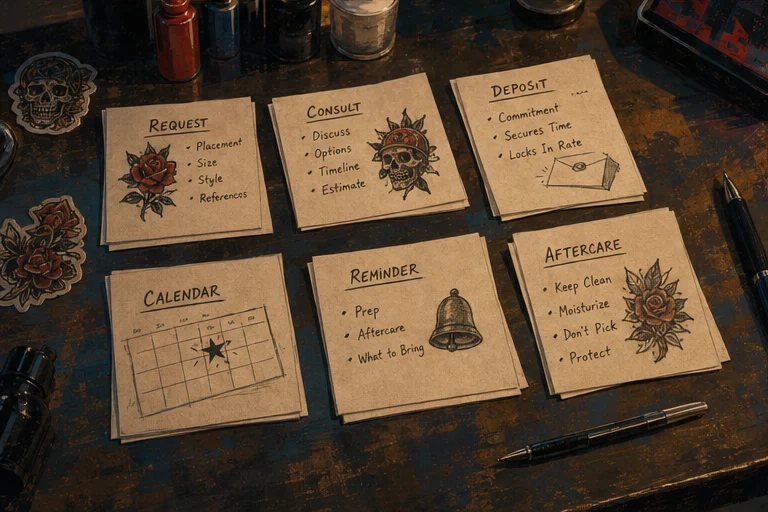
A strong booking flow keeps the request, consult, deposit, appointment, and follow-up connected.
LVL2 is tattoo booking software that includes integrated digital consent forms, client intake, and waivers. The intake flow collects Studio-configured fields (text, select choices, required checkboxes, and drawn signatures) linked directly to the booking and appointment record. Completion status tracks adult attestation (18+), electronic signature, and medical disclosures. On appointment day, staff conduct an in-person physical ID check (or at a studio tablet kiosk with a staff PIN) to verify age and identity. Digital form collection and signed records are operating tools, not identity verification, not age verification, and not legal advice; Studios retain responsibility for their own day-of policies and local jurisdiction regulations.
Sourced answers to core tattoo shop workflow questions
Sustainable growth comes from craft, client care, and business habits improving together.
Q04: What tools does a tattoo shop need to manage bookings, waivers, and artist payouts?
A tattoo shop needs five integrated tools to manage bookings, waivers, and artist payouts:
Structured booking requests: Intake forms that capture design ideas, placement, size, and reference images before calendar time is offered.
Deposit-first scheduling: Upfront deposit collection that locks reservations and reduces no-shows without manual chasing.
Digital waivers and client intake: Pre-session digital signing links and in-shop tablet kiosk check-in attached directly to the appointment record.
In-person staff ID checks: Manual verification where studio staff inspect physical government photo IDs before the session begins.
Automated artist payouts: Split-calculation and payout rails (via Stripe Connect) with clear fee schedules for booking deposits and session balances.
LVL2 brings all five tools into a single tattoo operating system.
Q11: Which tattoo booking software includes digital consent forms and waivers?
Tattoo booking software with digital consent forms and waivers includes LVL2, Venue, and Tattoo Studio Pro. Unlike generic salon schedulers (such as Vagaro, Fresha, Booksy, or Square Appointments) that require third-party e-signature add-ons or paper clipboards, LVL2 includes tattoo-native digital waivers built directly into the booking flow. Clients receive a pre-session signing link via SMS/email or sign at an in-shop check-in kiosk; signed records—including full legal name, adult attestation, health disclosures, drawn signatures, IP, and timestamped PDF snapshots—are stored in access-controlled client records and attached to the booking.
Q23: How do I collect digital tattoo consent forms, ID, and waivers before an appointment?
To collect digital tattoo consent forms, ID, and waivers before an appointment:
Configure terms: Set up your studio’s waiver text, medical disclosure prompts, and required acknowledgments in LVL2.
Deliver the link: When an appointment is scheduled or confirmed, LVL2 delivers a secure signing link (/sign-waiver/[signToken]) to the client via SMS or email.
Client signs digitally: The client opens the link on mobile or desktop, reviews the terms, completes health disclosures, attests to age (18+), and draws their signature on the screen.
Day-of kiosk fallback: If a client arrives without completing their waiver or walks in, they check in on the studio’s tablet kiosk (/kiosk/[shopSlug]) and complete the form.
Physical ID verification: Staff physically inspect the client’s government photo ID (driver’s license, passport, or national ID), confirm date of birth, and authenticate the check-in with their staff PIN. The signed document and timestamped audit record are permanently attached to the client’s booking file.
The full intake and waiver journey: pre-session to shop floor
Good studio operations make the money, time, and policy decisions visible before they become emergencies.
1. Pre-session digital signing (/sign-waiver/[signToken])
When a booking is confirmed, the client receives a dedicated, non-indexed signing link. The mobile-responsive signing interface presents:
Full waiver text: Scrollable agreement terms that must be reviewed before signing.
Full legal name: Text input matching the client’s legal identification.
Adult attestation (18+): A mandatory checkbox attesting that the signer is at least 18 years of age.
Electronic consent: A mandatory acknowledgment agreeing that the electronic signature carries legal effect under the E-SIGN Act.
Medical disclosures: Optional or required health disclosure status ("none" or "disclosed") and disclosure notes for conditions relevant to tattooing.
Drawn signature pad: An HTML5 touch/mouse canvas that captures the signer’s handwritten signature and converts it to a secure data URL.
Submitting the form is strictly gated: the Sign waiver action remains disabled until all required attestations are checked and a valid signature is drawn.
2. Day-of arrival and tablet kiosk check-in (/kiosk/[shopSlug])
For walk-ins or clients who did not sign in advance, the studio can run LVL2 kiosk check-in on a counter tablet:
Client looks up their appointment by phone number.
Client reviews the studio waiver and draws their signature on the tablet.
Guardian signature fields are supported where permitted by studio policy and local law.
3. In-person staff ID check
Software cannot look at a person and prove they match a card. LVL2 explicitly requires a manual in-person step:
Studio staff examine the physical government photo ID (passport, driving license, national ID, or state ID).
Staff confirm that the date of birth establishes legal majority (18+).
Staff enter their confidential staff PIN on the kiosk to certify that the ID was verified in person.
The system logs the staff member’s profile ID, check method (in_person, photo_id_shown, digital_id), ID type, and timestamp.
4. Roles, storage, and visibility boundaries
Consent records contain sensitive personal information. LVL2 enforces strict privacy boundaries:
Private storage buckets: Signatures and generated PDF documents are stored in private Supabase buckets (waiver-signatures and documents). Neither bucket is publicly browseable.
Signed URL access: File access uses short-lived, signed URLs generated on demand.
Client boundary: Signers can view only their own active signing session or their authenticated client portal (/client/waivers).
Studio boundary: Workspace members can view signed documents only for bookings within their workspace.
No public exposure: Public pages, metadata, crawlers, and AI citations never expose signatures, dates of birth, health notes, or private signing tokens.
Edge-case handling: what happens when things go wrong
Real shop operations encounter edge cases every week. LVL2 handles them through concrete system behaviors and clear handoffs to the artist:
1. Missing or unsubmitted waiver
System behavior: The appointment status displays Waiver Pending.
Action: Staff can resend the digital link via SMS or email with one click from the booking dashboard.
Day-of fallback: If the client arrives unsigned, they complete the waiver on the studio kiosk tablet before sitting down. Work does not begin until the status is complete.
2. Incomplete or declined consent
System behavior: The signing form will not submit. Checkboxes must be checked and the signature drawn before submission is possible.
Artist handoff: If a client refuses to agree to terms, declines a medical disclosure, or will not attest to legal age, the booking is paused immediately. The artist or shop owner resolves the situation according to studio policy. An unchecked box is never treated as consent.
3. Corrections and resubmissions
System behavior: Once signed, a waiver document snapshot and SHA-256 hash are locked to preserve audit integrity.
Update workflow: If a client needs to update their health disclosures or correct a name, the studio issues a new waiver link. The latest confirmed signature and snapshot become the authoritative operating record.
4. Inaccessible or expired links
System behavior: If a signing link has expired or is invalid, the client sees a clear error state: "This waiver link is invalid or expired. Please contact the studio."
Resolution: The client is instructed to contact the studio. Staff can reissue a fresh signing link instantly from the workspace dashboard. Private document links are never exposed in error responses.
Primary legal and regulatory standards
Tattoo waiver requirements depend on the jurisdiction where the studio operates and the studio's own risk policies. The following primary sources govern consent and health disclosures:
OSHA Bloodborne Pathogens Standard (29 CFR 1910.1030):
Federal United States standard requiring body art facilities to maintain exposure control plans, universal precautions, and documented sanitation procedures.
California Safe Body Art Act (Cal. Health & Safety Code §§ 119300–119328):
Mandates written client consent, health history questionnaires covering conditions that could affect healing, age verification against valid government identification (18+), and a minimum record retention period of two years.
Texas DSHS Tattoo and Body Piercing Rules (25 TAC § 229.406):
Requires written informed consent, explicit health disclosures (including history of bleeding disorders, heart conditions, or pregnancy), verification of adult age via government photo ID, and record maintenance for at least two years.
Florida Department of Health (Rule 64E-28, Florida Administrative Code):
Requires written informed consent, parental/guardian consent forms where permitted, and strict facility record-keeping standards.
Electronic Signatures in Global and National Commerce Act (15 U.S.C. § 7001 et seq., E-SIGN) & UETA:
Establishes that digital signatures and electronic records satisfy legal writing requirements when consumer consent is provided and documents are accurately retained.
Legal Disclaimer: LVL2 provides digital record capture and electronic signing workflows. LVL2 is not a law firm and does not provide legal advice, automated identity verification, or automated age verification. Enforceability and consent requirements vary by state, county, and local public health ordinances. Studios must verify client ID in person and consult qualified legal counsel to ensure their specific waiver terms comply with all applicable laws.
Structuring your intake: creative brief vs. operating record
A complete intake form serves two distinct functions that should not be confused:
The Creative Brief (Project Alignment)
Reference images: 1–3 reference photos to establish visual direction and line-weight preferences.
Placement & sizing: Body placement and approximate dimensions in inches or relative to scale markers.
Style direction: Traditional, blackwork, realism, Japanese, neotraditional, geometric, or fine-line.
Budget & scheduling flexibility: Preferred days of the week and budget boundaries.
The Operating Record (Studio & Client Protection)
Legal name and contact: Client legal name, email, and phone number for booking updates.
Health disclosures: Studio-mandated prompts regarding conditions that may affect healing or procedure safety.
Aftercare acknowledgment: Receipt and agreement to follow the studio’s written aftercare protocol.
Electronic consent & signature: Clear acknowledgment of terms and drawn digital signature.
Safe synthetic data examples
To protect client privacy, public documentation, tutorials, and marketing materials must never display real personal identifying information. The following synthetic test record illustrates an authorized data layout: